Viral Hooks
Trending short videosVideo game style hiking tutorial
Z

@zionnps

Instagram · Speaker address
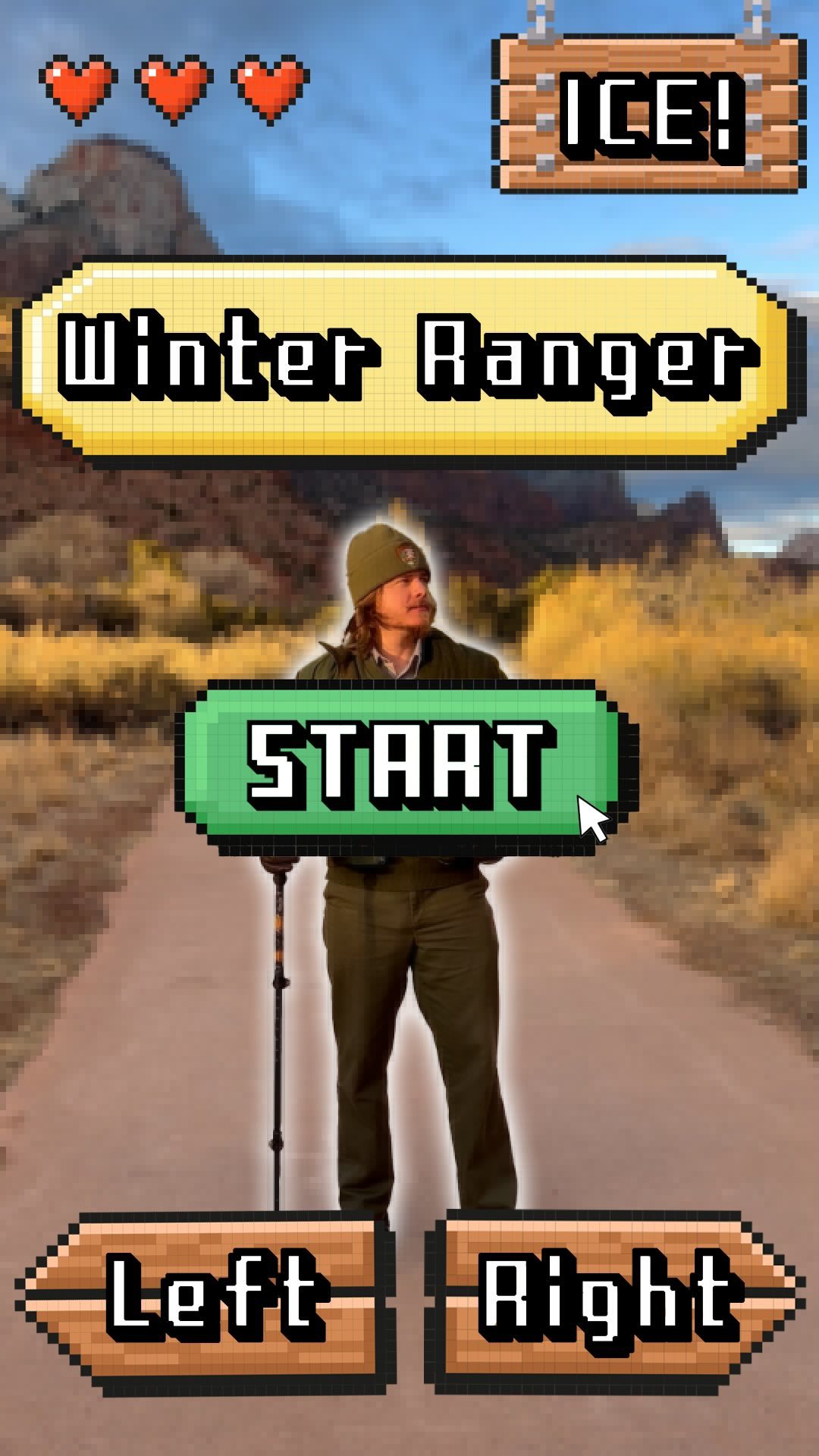
@zionnps Is this the Zion video game everyone keeps talking about??? Winters in Zion are cold and wet, which means the trails can get pretty icy. Before heading out on your day, make sure to be prepared, like Ranger Jarret! Check conditions and consider wearing warm layers and traction devices like crampons or microspikes so you can hike safely. How to wear layers: outer layers should repel water and stop the wind, middle layers should insulate the body and “breathe” easily, and inner layers of clothing should be of materials that “wick” moisture away from the skin. Want to plan like a park ranger before coming to Zion in the winter? We have a video on our YouTube page @ZionNPS that tells you everything you need to know, linked on our story! Video: A cursors clicks start and you begin the game! With the cursor on screen, our task (the players), is to get Ranger Jarret, standing outside with large red, white, and orange sandstone cliffs behind him, ready for winter conditions. The cursor clicks and drags a sweater, jacket, scarf, hat and gloves to customize the ranger in the best winter gear. You’ve passed level one! Now, we click hike to start our trail. We’re on the paved trail, with sandstone cliffs behind Ranger Jarret, but it we have reports of ice ahead. The cursor clicks and drags traction devices, a hiking pole, and a water bottle to the ranger so he’s prepared for his hike. Level two complete! Click hike and the ranger hikes off into the distance. Click play again for another game!

View original on Instagram

The edit1 shot · 15 text
Shots Text

Performance

Views
159.8K
Likes
8.1K
Comments
125
Engagement
5.2%

Video #3211 · Speaker address

Video game style hiking tutorialfrom @zionnps

[01]

Overview

A park ranger, presented as a video game character, guides the viewer through preparing for a winter hike. The creator uses a cursor graphic to 'equip' the ranger with appropriate layers of clothing (sweater, jacket, scarf, beanie, gloves) and then essential gear for icy conditions (traction devices, hiking stick, water). After being fully prepared in two 'levels', the ranger thanks the viewer and walks off to begin his hike.

[02]

Simple outline

  1. 1Introduce interactive premise
  2. 2Solve initial problem
  3. 3Introduce escalated problem
  4. 4Solve escalated problem
  5. 5Show successful outcome

[03]

Related videos

[04]

Classification

Concepts
Tutorial / How To
Elements
Gamified UI OverlayText Overlay
Account

[05]

Hook analysis

What stops the scroll in the first 3 seconds

Title hook

START

Verbal hook

Howdy. I'm ranger Jared. It's getting pretty cold out, so let's prepare for winter conditions.

Visual hook

A park ranger stands in a scenic mountain landscape with various articles of winter clothing floating around him and a large, pixelated green 'START' button with a cursor over it, immediately establishing a video game theme.

[07]

Hook and payoff

The promise the opener makes, and how the video pays it back

Hook

An interactive 'Start' element immediately establishes a gamified premise, followed by a character introducing a relatable, initial problem.

Payoff

The fully-equipped subject confidently proceeds on their journey, visually demonstrating the successful outcome of the preparation, followed by a 'Play Again' prompt to encourage re-engagement.

[08]

Narrative framework

The structural pattern this video runs on

Framework

The Interactive Level-Up

Framing a multi-step preparation or transformation process as an interactive, two-level video game where the viewer 'equips' the subject to overcome escalating challenges.

  1. 1

    The Basic Loadout

    The viewer, represented by a cursor, selects and applies general-purpose items to the subject to solve the initial problem. Each application is confirmed with a brief statement of purpose.

  2. 2

    The Level Transition

    A clear, interactive call-to-action (e.g., a 'Hike' button) signals the completion of the first stage and moves the narrative to the next challenge.

  3. 3

    The Challenge Escalation

    The subject encounters a new, more specific, and difficult obstacle, stating the need for more advanced preparation.

  4. 4

    The Specialized Toolkit

    The viewer equips the subject with a new set of specialized tools or items specifically designed to overcome the escalated challenge.

  5. 5

    The Player Gratitude

    The subject breaks the fourth wall to directly thank the viewer for their help, solidifying the viewer's role as a participant and creating a feeling of accomplishment.

Themes

  • Safety
  • Preparedness
  • Nature
  • Education

Techniques

  • Gamification
  • Graphic Overlays
  • Direct Address

Trends

  • Interactive Content
  • Educational Entertainment

Post caption

Is this the Zion video game everyone keeps talking about??? Winters in Zion are cold and wet, which means the trails can get pretty icy. Before heading out on your day, make sure to be prepared, like Ranger Jarret! Check conditions and consider wearing warm layers and traction devices like crampons or microspikes so you can hike safely. How to wear layers: outer layers should repel water and stop the wind, middle layers should insulate the body and “breathe” easily, and inner layers of clothing should be of materials that “wick” moisture away from the skin. Want to plan like a park ranger before coming to Zion in the winter? We have a video on our YouTube page @ZionNPS that tells you everything you need to know, linked on our story! Video: A cursors clicks start and you begin the game! With the cursor on screen, our task (the players), is to get Ranger Jarret, standing outside with large red, white, and orange sandstone cliffs behind him, ready for winter conditions. The cursor clicks and drags a sweater, jacket, scarf, hat and gloves to customize the ranger in the best winter gear. You’ve passed level one! Now, we click hike to start our trail. We’re on the paved trail, with sandstone cliffs behind Ranger Jarret, but it we have reports of ice ahead. The cursor clicks and drags traction devices, a hiking pole, and a water bottle to the ranger so he’s prepared for his hike. Level two complete! Click hike and the ranger hikes off into the distance. Click play again for another game!
Text overlays

  • call-to-action · beginning

    START

  • informational · beginning

    Howdy, I'm Ranger Jarret. It's getting pretty cold out, so let's prepare for winter conditions.

  • contextual · beginning

    A sweater!

  • contextual · beginning

    Jacket! Layers.

  • contextual · beginning

    A scarf!

  • contextual · middle

    A beanie! Great idea.

  • informational · middle

    Gloves. Super handy when hanging on to cold chains.

  • call-to-action · middle

    HIKE

  • contextual · middle

    Let's go enjoy our hike!

  • informational · middle

    I've got reports of ice ahead. I should be more prepared.

  • informational · middle

    Traction devices. Now I'm ready to dig into that ice.

  • contextual · middle

    Hiking stick!

  • informational · end

    Water! Can't live without it.

  • contextual · end

    Thank you so much for helping me prepare for my hike!

  • call-to-action · end

    PLAY AGAIN

Transcript

Howdy. I'm ranger Jared. It's getting pretty cold out, so let's prepare for winter conditions. A better. Jacket. Layers. A scarf. A beanie. Great idea. Gloves. Super handy when hanging on to cold chains. Let's go enjoy our hike. I've good reports of ice ahead. I should be more prepared. Fraction devices. Now I'm ready to dig into that ice. I rank stick. Water. Can't live without it. Thank you so much for helping me prepare for my hike.