Viral Hooks
Trending short videosWeb design tool review anecdote
J

@joshfromyolkk

TikTok · Talking Head Edit

@joshfromyolkk Embarrassing 😅🤦‍♂️. I’ve had the Smooothy slider page open in my tabs for weeks. I think Chrome thinks it's my new homepage 😂. Turns out it’s by an incredible chap (Federico) - who I not only met a couple of months ago but have a terrible selfie with! Smooothy is an incredibly smooth WebGL-friendly slider and their site recently won an Awwwards Site of the Day. Here’s why I love it ↓ 🧈 Ridiculously smooth motion - the drag, easing and transition timing are perfect. 🎯 Practical structure - draggable, clickable, keyboard-controllable. It just works. 💡 Cloneable + customisable - I’ve already added it to one of my own builds (with clickable elements + keyboard nav). Finding a truly great slider is hard. Swiper [.js] is solid, GSAP sliders are fun - but this one has a character to it. It’s playful, professional and just feels right. Sliders are important! Definitely check out "smooothy . federic . ooo"! Can you change that pic to your face Federico 👀. #WebDesign #GSAP #WebGL #Slider #InteractionDesign #Awwwards #WebsiteInspiration

View original on TikTok

The edit1 shot · 0 text
Shots2:55

Performance

Views
72.8K
Likes
1.7K
Comments
18
Engagement
2.3%
Length · 11 Oct 2025
2:55

Video #5395 · Talking Head Edit

Web design tool review anecdotefrom @joshfromyolkk

[01]

Overview

The creator shares his enthusiastic discovery of a web design slider called 'Smooothy,' demonstrating its features on the official website and his own project. He then reveals his embarrassing realization that the slider was made by Federico, an acquaintance he recently met, showing a selfie of them together as proof. He contrasts Smooothy with other sliders, explains why they are important for user experience, and highlights other award-winning sites that use it.

[02]

Simple outline

  1. 1Confess embarrassing oversight
  2. 2Showcase impressive tool
  3. 3Reveal personal connection
  4. 4Explain core principle

[03]

Related videos

[04]

Classification

Concepts
Buying ListAnecdotal Philosophy
Elements
Screen RecordingPicture-in-PictureB-Roll Cutaway

[05]

Hook analysis

What stops the scroll in the first 3 seconds

Verbal hook · 65%

I can't believe I didn't notice. Honestly, it's so embarrassing.

Visual hook · 35%

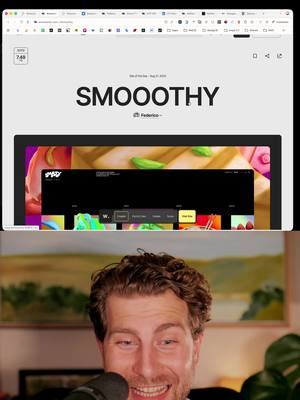
A split-screen layout showing the creator's face in the bottom half and a screen recording of a website with the large title 'SMOOOTHY' in the top half.

[06]

Hook template

Steal this for your own video

I can’t believe I didn’t notice that [surprising discovery] was created by [unexpected connection].

  • — I can’t believe I didn’t notice that this viral workout app was created by my old personal trainer.
  • — I can’t believe I didn’t notice that my favorite budgeting tool was created by someone from my college class.
  • — I can’t believe I didn’t notice that this award-winning recipe site was created by my neighbor.

[07]

Hook and payoff

The promise the opener makes, and how the video pays it back

Hook

Start with a strong, self-deprecating emotional statement about a mistake, creating immediate curiosity about the subject of the error.

Payoff

Conclude with a strong, summarized endorsement that ties back to the personal connection, leaving the audience with both a positive feeling about the subject and the storyteller.

[08]

Narrative framework

The structural pattern this video runs on

Framework

The Personal Connection Reveal

Frame a product showcase within a personal, humorous anecdote about the creator's connection to it, turning a simple review into a relatable story that builds credibility and engagement.

  1. 1

    The Object of Admiration

    Introduce the subject and establish its high value. Demonstrate its key features and explain why it's a superior solution to a common problem.

  2. 2

    The Personal Stake

    Show a personal application or use case for the subject, proving genuine investment and demonstrating its practical value beyond a simple review.

  3. 3

    The 'D'oh!' Reveal

    Pivot the narrative by revealing the embarrassing personal oversight or mistake related to the subject, creating a humorous and relatable turning point.

  4. 4

    The Tangible Proof

    Provide concrete, often visual, evidence that validates the personal connection or mistake, delivering a satisfying and funny payoff to the story.

  5. 5

    The Expert Zoom-Out

    Broaden the context by explaining the underlying principle or importance of the subject's category, using comparisons to establish authority and add educational value.

  6. 6

    The High-Status Association

    Reinforce the subject's quality by showcasing its use in other high-quality, award-winning, or respected contexts, adding credibility through association.

Themes

  • Web design tools
  • User experience
  • Creator community
  • Personal anecdotes

Techniques

  • Screen recording
  • Picture-in-picture
  • Personal storytelling

Post caption

Embarrassing 😅🤦‍♂️. I’ve had the Smooothy slider page open in my tabs for weeks. I think Chrome thinks it's my new homepage 😂. Turns out it’s by an incredible chap (Federico) - who I not only met a couple of months ago but have a terrible selfie with! Smooothy is an incredibly smooth WebGL-friendly slider and their site recently won an Awwwards Site of the Day. Here’s why I love it ↓ 🧈 Ridiculously smooth motion - the drag, easing and transition timing are perfect. 🎯 Practical structure - draggable, clickable, keyboard-controllable. It just works. 💡 Cloneable + customisable - I’ve already added it to one of my own builds (with clickable elements + keyboard nav). Finding a truly great slider is hard. Swiper [.js] is solid, GSAP sliders are fun - but this one has a character to it. It’s playful, professional and just feels right. Sliders are important! Definitely check out "smooothy . federic . ooo"! Can you change that pic to your face Federico 👀. #WebDesign #GSAP #WebGL #Slider #InteractionDesign #Awwwards #WebsiteInspiration

Transcript

I can't believe I didn't notice. Honestly, it's so embarrassing. I've had this open in my tabs for so long now because I really wanted to experiment with it. This is smoothie, a gorgeous slider. Like, sliders on websites are so important, and they're often quite difficult to get right and it's such a beautiful one and I love all their examples here I love the way they're presenting these examples as well with the controls this one's cool because it uses arrow keys left and right you can go here This one's just really cool. Just a little bit of movement on it is awesome. I even started playing around with my own tier. So this is a website still needs tweaking. But I've got the slider in here rank again, like, it's draggable. I've got clickable elements as well which is super important. It's just really really cool. But honestly what an idiot. I didn't realize I just didn't look. It's by Frederico and I met Frederico only a little while ago. Good, here's our selfies. He's so lovely. He was honestly so so lovely. And I just didn't realize, but I've Yeah. I've been playing around with smoothie sliders in my projects. There's one that you can clone in Webflow here. I must have been like 30 of these clones. I keep cloning it and then Oh, so they won an awards.com site of the day. And as I said, sliders are just so important. Like, the other day we looked at Damso, this really, really innovative and fun e worse website with this, you know, little what is it? Like rank iPhone, sort of thing tier. It's got this lovely clicking sound as well. This actually uses Swiper JS, which is like a really common slider. But it is so important, sliders on websites, because you can hide information. You know, instead of users having to scroll past everything, imagine them having to scroll past every single element that's in this slider here. No. You can just hide it to the right or the best. And then they can, of course, just slide past it if they need to. And if they want the information that's there, it's really easy and accessible. I think this was made particularly because it's good with WebGL, WebGL components, and they work really, really nicely in it. So I might as well highlight that. But it's also used on this awards.com site, which is a lovely site as well. Look at this. Best beautiful. And I think let's press enter here. And I've I've been told it's used on this. And again, just so smooth, so quick. No, yeah, finding a good slider is hard. Swiper JS, very cool. I've seen some GSAT ones, really cool as well. But Smoothie, Smoothie by Frederico, absolutely lovely. Awards.com site of the day from quite a while ago now. Very, very cool. Absolutely love it. Love Frederico as well.

Web design tool review anecdote | Viral Hooks