@kallaway If you’re trying to design things faster, this is a cheat code AI workflow.
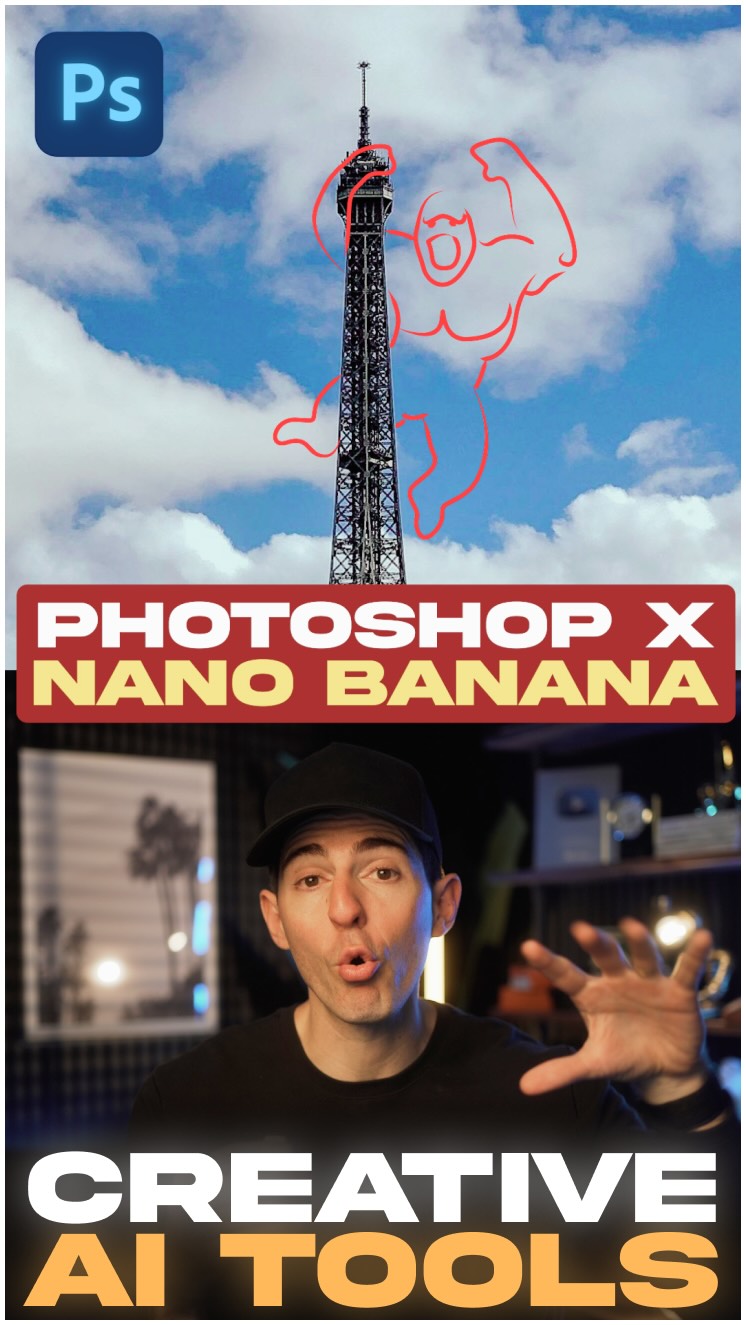
What you’re looking at is Google’s top AI image model, Nano Banana, built directly instead of Gen Fill in @photoshop.
To use it, all you have to do is make a rough selection on any image, click Generative Fill, make sure Nano Banana is selected, add your prompt and hit generate.
You can easily draw shapes or rough sketches to instantly add anything to any image.
You can swap text with perfect accuracy and detail.
You change colors, patterns, textures, or quite literally anything else you can imagine.
Sketches to photorealistic detail. Mockups to 3D renders.
It all works perfectly right out of the box.
The reason why designers are raving about this model is because of the visual consistency and cohesion that comes with any edit.
And having it in Photoshop is huge because each generation is an independent layer that can still be edited and adjusted with the same Adobe tools you already love.
If you’re a designer, marketer, or entrepreneur that needs to use visual imagery to tell stories, this workflow will speed things up 10x.
Try out Photoshop with Nano Banana today!
Follow @kallaway for more videos like this
#adobephotoshoppartner #ai #artificialintelligence #tech #technology #newtech #creator #designer #adobe #adobephotoshop #adobepartner #google #nanobanana
The creator introduces and demonstrates Google's 'Nano Banana' AI model, a new feature integrated into Adobe Photoshop's Generative Fill. He explains the simple steps to use it and then showcases a rapid montage of its capabilities, such as adding objects from rough sketches, swapping text, changing patterns, and turning drawings into photorealistic renders. He concludes by highlighting the benefits of visual consistency and non-destructive layers for designers, marketers, and entrepreneurs, ending with a call-to-action to try the feature.
You wanna design things faster, this is the AI workflow.
Visual hook · 45%
A photo of the Eiffel Tower with a red, hand-drawn sketch of a muscular gorilla-like figure climbing it, immediately signaling creative image manipulation.
[07]
Hook and payoff
The promise the opener makes, and how the video pays it back
Hook
Address a common user pain point or aspirational goal to establish immediate relevance and promise a solution.
Payoff
Directly address the target audience, summarize the ultimate value proposition as a 'game-changer,' and provide a clear, low-friction call to action.
[08]
Narrative framework
The structural pattern this video runs on
Framework
The Capability Gauntlet
To introduce a new tool or method by first stating a common user goal, then demonstrating the tool's power and versatility through a rapid-fire series of diverse examples, and finally explaining the underlying principle that makes it superior to alternatives.
1
The Solution Reveal
Introduce the specific product, tool, or method as the answer to the hook's promise, naming its key components and establishing credibility.
2
The 'It's This Easy' Demo
Demonstrate the core workflow in its simplest form to lower the barrier to entry and showcase ease of use.
3
The Capability Gauntlet
Present a fast-paced montage of diverse and increasingly impressive use cases to prove the solution's power, versatility, and effectiveness across different scenarios.
4
The Expert's Insight
Move beyond 'what' the tool does to 'why' it's uniquely effective, explaining the core principle or feature that provides a key advantage like consistency or accuracy.
5
The Ecosystem Advantage
Highlight how the solution integrates seamlessly into an existing, familiar workflow or platform, reinforcing its practical value and ease of adoption.
Themes
Artificial Intelligence
Creative Workflow
Technology Integration
Productivity
Techniques
Product Demonstration
Screen Recording
Voiceover Narration
Picture-in-Picture
Trends
AI in creative tools
Sponsored content
Post caption
If you’re trying to design things faster, this is a cheat code AI workflow.
What you’re looking at is Google’s top AI image model, Nano Banana, built directly instead of Gen Fill in @photoshop.
To use it, all you have to do is make a rough selection on any image, click Generative Fill, make sure Nano Banana is selected, add your prompt and hit generate.
You can easily draw shapes or rough sketches to instantly add anything to any image.
You can swap text with perfect accuracy and detail.
You change colors, patterns, textures, or quite literally anything else you can imagine.
Sketches to photorealistic detail. Mockups to 3D renders.
It all works perfectly right out of the box.
The reason why designers are raving about this model is because of the visual consistency and cohesion that comes with any edit.
And having it in Photoshop is huge because each generation is an independent layer that can still be edited and adjusted with the same Adobe tools you already love.
If you’re a designer, marketer, or entrepreneur that needs to use visual imagery to tell stories, this workflow will speed things up 10x.
Try out Photoshop with Nano Banana today!
Follow @kallaway for more videos like this
#adobephotoshoppartner #ai #artificialintelligence #tech #technology #newtech #creator #designer #adobe #adobephotoshop #adobepartner #google #nanobanana
Text overlays
title · beginning
PHOTOSHOP X NANO BANANA
informational · beginning
AI workflow
informational · beginning
AI image model
informational · middle
visual consistency
informational · middle
is an independent layer
branding · throughout
#Adobephotshoppartner
Transcript
You wanna design things faster, this is the AI workflow. It's Google's new AI image model, no banana, integrated directly inside of generative fill in Adobe Photoshop. And I partnered with Adobe because this combination is magical for design. All you have to do is make a selection using the selection brush, click generate a fill with nano banana, add your prompt, and hit generate. And it just works. For example, you could draw simple shapes or rough sketches and instantly add anything to any image. You could swap text with perfect accuracy and detail. You could change colors, patterns, textures, or quite literally anything else you could imagine in the image. Sketches to photo realistic detail, mock ups to three d renders, and it all works perfectly right out of the box, like shockingly well. The reason why every designer I know is raving about this model is because of the visual consistency and cohesion that comes with every edit. And having it inside of Photoshop is huge because every generation with Nanobanana is an independent layer that can still be adjusted with the same Adobe tools you already love. If you're a designer, marketer, or entrepreneur that needs to use visual imagery to tell stories, this workflow is a game changer. You rank try it today on Photoshop.