@fakeplasticbrands
Instagram · Greenscreen Talking Head

@fakeplasticbrands All images are from the internet archive. GUARANTEED YOU’VE SEEN THEM NOWEHRRE ELSE.

@fakeplasticbrands
Instagram · Greenscreen Talking Head
@fakeplasticbrands All images are from the internet archive. GUARANTEED YOU’VE SEEN THEM NOWEHRRE ELSE.
Performance
Video #19338 · Greenscreen Talking Head
[01]
The creator provides a tutorial on how to use the Internet Archive for creative inspiration. He explains the importance of mindset over search terms, warns about uncensored content, and walks the viewer through setting up an account, starting with broad image searches, using filters, and then diving deeper by exploring uploader profiles and collections to find unique content. He ends by teasing a part two for more in-depth tips.
[02]
[03]
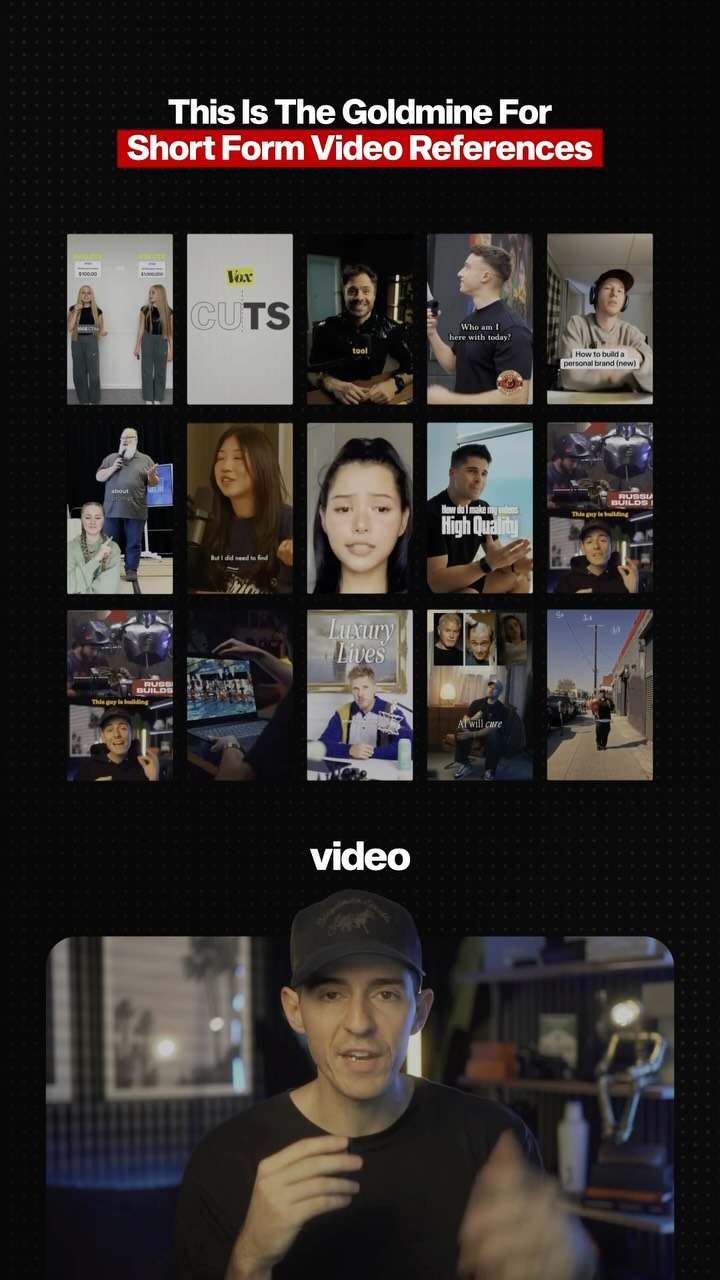 155.1K1.7×Showcasing a video reference database@kallawaymarketing · Product Demo
 4.7M1.8×Creator demos visual learning website@rileybrown.ai · Resource
 2M8.9×AI building tutorial without code@covacut · Tutorial / How To
 212.8K114.2×Posting notes with anti-AI message@gstudios_centralcoast · Hot Take
 274.8K8.2×Creator explains AI content cloning@angus.sewell · Breakdown
 599.9K7.6×AI video tool before/after tutorial@rourke · Tutorial / How To
 1.2M48.5×Greenscreen internet history explainer series@internet.anthropology · Breakdown
 443.2K2.3×Creator explains his AI automation@jasoncooperson · Breakdown
 2.2M14.2×Explaining AI's unreliable information sources@wetclaude · Breakdown
 1.3M28.6×Using AI to hack content trends@orenmeetsworld · Breakdown
 497.7KHow to get free AI video tool@hustle.faceless · Opportunity Explainer
 596.3K3.1×AI tool tutorial in steps@rourke · Tutorial / How To
[04]
[05]
What stops the scroll in the first 3 seconds
Title hook · 35%
HOW TO USE THE INTERNET ARCHIVE
Verbal hook · 25%
The Internet Archive is one of the best wells of inspiration.
Visual hook · 40%
A striking, vintage-style poster of a person in a motorcycle helmet with glowing red eyes, creating a mysterious and visually arresting opening.
[07]
The promise the opener makes, and how the video pays it back
Hook
Juxtapose the immense value of a resource with its primary usability flaw, promising to provide the solution and 'ungatekeep' the knowledge.
Payoff
Conclude with a call-to-action that functions as a cliffhanger, promising to reveal even more valuable, in-depth information in a subsequent piece of content to incentivize a follow.
[08]
The structural pattern this video runs on
Framework
The Ungatekeeper's Guide
To empower the audience by revealing the 'correct' way to use a powerful but non-intuitive tool, moving from a philosophical mindset shift to actionable, expert-level techniques.
The Mindset Reframe
Challenge the user's conventional approach and introduce a new, more effective philosophical framework for using the tool.
The Expectation Setter
Define the ideal user experience as one of serendipitous discovery rather than direct, targeted searching, managing expectations for success.
The Unfiltered Reality Check
Provide a candid warning about the tool's unmoderated nature, which builds trust and prepares the user for potential edge cases.
The Initial Entry Point
Give the audience the first, most basic actionable steps to get started, lowering the barrier to entry.
The Funnel Tactic
Teach the core methodology: start with a broad query and then use the tool's built-in features to systematically narrow the results.
The Rabbit Hole Principle
Introduce the advanced concept of leveraging an initial discovery to explore deeper, related content threads.
The Source-Mining Technique
Reveal a pro-tip: analyze the creator/uploader of a valuable item to find other high-quality contributions from the same source.
The Category-Mining Technique
Reveal a second pro-tip: analyze the collection/category an item belongs to in order to find similarly tagged or curated content.
All images are from the internet archive. GUARANTEED YOU’VE SEEN THEM NOWEHRRE ELSE.
title · beginning
HOW TO USE THE INTERNET ARCHIVE
contextual · beginning
ARCHIVE
contextual · beginning
INSPIRATION.
contextual · beginning
THE WORST
informational · middle
IT'S HOW YOU THINK.
informational · middle
WARNING,
informational · middle
REALLY CENSOR.
contextual · middle
PROCESS.
call-to-action · end
FOLLOW FOR PART 2
Internet Archive is one of the best wells of inspiration. It also has the worst UI imaginable. Let's ungatekeep it. The most important thing about the Internet Archive isn't how you search, it's how you think. You basically just want to get lost in the online version of the library of Alexandria. You can always search for whatever you need, but expect to stumble on better things along the way. A fair warning though, the archive doesn't really censor, so expect your search to come up with some pretty not safe for work stuff every once in a while. That's just part of the process. So set up an account first rank click on images and all images. You want to start off broad searching something like posters, photography, nature, manuals, and then use the filters on the left to narrow down your search. And once you find something interesting, keep going down that rabbit hole. Look through what the uploader has uploaded. If they already shared one good piece of content, there's a high likelihood that the other stuff they uploaded is also pretty decent. Same can be said for collections. Once you find an image that you like, you can click on the collection category and browse through anything that is similar or has been tagged in the same way. If you want to learn more about how to use the Internet Archive, follow for part two. We will go further in-depth with how to find the best inspiration online that no one else is using.