Video #18327 · Talking Head Edit
Designer demos AI website builderfrom @_alexpillow
A web designer introduces a 'secret' AI tool, Relume, for building websites quickly. He demonstrates the entire process, from inputting a text prompt for his new photography brand to the AI generating a sitemap and wireframes, then shows how he customizes the design and exports it to Figma, concluding with a before-and-after comparison to showcase the tool's efficiency.
- 1State expert authority & secret
- 2Present personal use case
- 3Demonstrate tool's core function
- 4Show visual transformation
- 5State ultimate benefit
ConceptsTutorial / How ToProduct DemoBuying List
ElementsScreen RecordingB-Roll CutawayText OverlayImage Overlay
[05]
Hook analysis
What stops the scroll in the first 3 seconds
Title hook · 60%
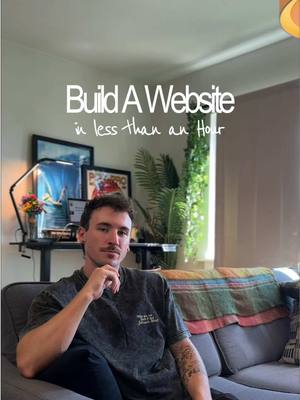
Build A Website in less than an Hour
Verbal hook · 40%
I design websites for a living, and I'm here to let you in on a little secret.
Visual hook
A medium shot of the creator in a well-composed, aesthetically pleasing room, establishing a professional and creative atmosphere.
[06]
Hook template
Steal this for your own video
[Achieve big result] in less than [short timeframe]
- — Build a Website in less than an Hour
- — Meal Prep a Full Week of Lunches in less than 30 Minutes
- — Learn a Conversational Chord Progression in less than 10 Minutes
[07]
Hook and payoff
The promise the opener makes, and how the video pays it back
Hook
Establish professional authority ('I do this for a living') and then present a bold, counter-intuitive claim that promises a significant shortcut or improvement ('build a website in under an hour').
Payoff
Conclude by summarizing the core value proposition ('It's still my design, [the tool] just handles the heavy lifting'), emphasizing how the tool liberates the user to focus on the more enjoyable, creative aspects of their work.
[08]
Narrative framework
The structural pattern this video runs on
Framework
The Expert's Shortcut
An expert reveals a 'secret' tool or method by demonstrating its use in a personal, relatable project, culminating in a clear transformation and a statement of the ultimate benefit: efficiency and creative freedom.
- 1
The Personal Use Case
Ground the abstract claim in a tangible, personal project or problem ('I just started a brand... it needs a website'), making the need for the solution relatable and authentic.
- 2
The AI-Powered Foundation
Demonstrate the tool's core 'magic' by showing a simple user input (typing a prompt) that generates a complex, high-value output (sitemap and wireframes) automatically.
- 3
The User's Control
Showcase features that allow for customization and refinement ('tweak the structure, customize sections, use the style guide'), addressing the potential objection that the tool is too rigid and proving the user retains creative control.
- 4
The Seamless Handoff
Demonstrate how the tool's output integrates perfectly into an existing professional workflow or ecosystem ('export it straight to Figma'), removing friction for the target user.
- 5
The Transformation Proof
Provide a clear, satisfying 'Before' and 'After' visual comparison to prove the tool's effectiveness and deliver the visual climax of the narrative.
Themes
- Productivity
- AI in design
- Efficiency
Techniques
- Screen recording
- Before and after comparison
Trends
Post caption
I design websites all day every day, and I’m telling you: this tool actually lets you build a site super fast🙏 Punch in a prompt and Relume’s AI generates a full sitemap, wireframes, and even visual concepts you can export straight to Figma or Webflow. It’s pretty wild😮💨 Try it yourself! Comment “website” and I'll send you a link 🤙 @Relume #relume #webdesign #uiwebbuilder #designtools #figma
Text overlays
title · beginning
Build A Website in less than an Hour
branding · beginning
THREE PRONG
informational · beginning
A GOOD WEBSITE!
informational · middle
Three Prong Branding: Applied ✅
contextual · middle
Before 😔
contextual · middle
After 😄
Transcript
Design websites for a living, and I'm here to let you in on a little secret. There's actually a way you can make a website in under an hour. I just started a brand for my photography called three pronged. And what does every great brand need? A good website. Let me show you how Realum's AI can take an idea from a concept to a layout really fast. I start by typing in what I want tier site to include and more info about the rank. Then, Realoom instantly builds a sitemap and converts it into wireframes. From there, I good tweak the structure, I can customize sections, and I can use the Style Guide Builder to give it that clean, minimal three pronged look. Once I have everything dialed in, I can export it straight to Figma, and then I can refine the little details. It's still my design, Relloom just handles the heavy lifting. Then all I have to worry about is the creative side.