Viral Hooks
Trending short videosShowing the process of creation
S

@softgirlnocode

Instagram · Vlog
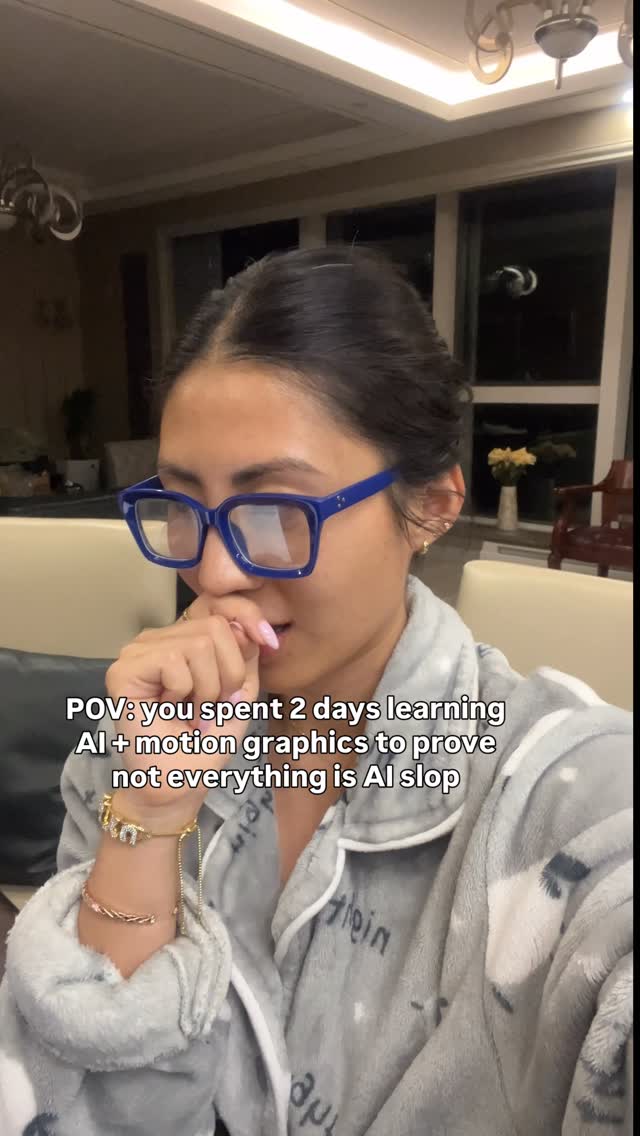
@softgirlnocode This is after many ugly versions and 1.5 days of struggle. As you can see there are still minor tweaks that are needed like titles are being blocked in the first couple seconds, but this is super hopeful. Things i learnt: 1. It will be difficult to edit long form videos as AI is validating and reviewing video frame by frame (taking a screenshot every couple of seconds) so it will blow your ram and storage. 2. The results are much better when you give AI a direction of what you want to see from scene to scene. 3. If you are changing raw video it’s better to start from a new project instead of continue it in the old folder. Special shoutout to @openaicodex for not reaching usage limit once @nateherkai for incredible YouTube resource #sidequest #tech #claude #videoedit #openai
View original on Instagram

The edit1 shot · 4 text
Shots Text0:30

Performance

Views
234.5K
Likes
6.6K
Comments
256
Engagement
2.9%
Outlier
5.9×
Length · 25 Apr 2026
0:30

Video #37603 · Vlog

Showing the process of creationfrom @softgirlnocode

[01]

Overview

The creator documents her 2-day process of learning AI and motion graphics to create a high-quality explainer video. She starts by showing herself looking tired, then displays screen recordings of the rendering process and file structure, and concludes by showcasing the final, polished video which uses animated graphics to explain the technical concept of 'MCP Tax' in AI models.

[02]

Simple outline

  1. 1State a hidden problem
  2. 2Name the specific cause
  3. 3Explain the mechanism
  4. 4Provide an actionable fix

[03]

Related videos

[04]

Classification

Format
Concepts
Journey DocumentationBehind The ScenesPerformance Proof
Elements
Motion GraphicsScreen RecordingText OverlayB-Roll Cutaway

[05]

Hook analysis

What stops the scroll in the first 3 seconds

Title hook · 75%

POV: you spent 2 days learning AI + motion graphics to prove not everything is AI slop

Visual hook · 25%

A close-up shot of the creator looking tired and thoughtful, covering her mouth. This creates immediate human interest and a relatable 'in-the-trenches' feeling.

[06]

Hook template

Steal this for your own video

POV: you spent [timeframe] learning [skill] to prove [controversial stance]

  • — POV: you spent 3 weeks learning hand lettering to prove digital fonts can't replace real craft
  • — POV: you spent 48 hours learning sourdough fermentation to prove store-bought bread is a scam
  • — POV: you spent a weekend learning video editing to prove you don't need to hire an agency

[07]

Hook and payoff

The promise the opener makes, and how the video pays it back

Hook

Present a counterintuitive or surprising claim that implies the viewer is making a common mistake or incurring a hidden cost, often through a direct comparison.

Payoff

Deliver a clear, simple, and actionable solution that directly resolves the identified problem, visually demonstrating the fix to empower the viewer.

[08]

Narrative framework

The structural pattern this video runs on

Framework

The Hidden Cost Explainer

To expose a common but unknown problem within a specific domain and provide a simple, actionable solution, thereby positioning the creator as an expert with valuable insider knowledge.

  1. 1

    The Named Antagonist

    Give the abstract problem a concrete, memorable name to make it tangible and easy to reference (e.g., 'the MCP tax').

  2. 2

    The System Breakdown

    Explain the common setup or process that leads to this problem, using relatable examples of tools or behaviors to ground the issue in the viewer's experience.

  3. 3

    The Core Mechanism Reveal

    Detail the specific technical or procedural reason why the problem occurs, using motion graphics to visualize and simplify the complex interaction.

  4. 4

    The Consequence Escalation

    Emphasize the negative impact of the problem by explaining that it happens constantly and unnecessarily ('on every single message even if it's just sitting there').

Themes

  • Learning new skills
  • Creator process
  • Tech education
  • Effort vs. output

Techniques

  • Screen recording
  • Motion graphics
  • POV framing

Post caption

This is after many ugly versions and 1.5 days of struggle. As you can see there are still minor tweaks that are needed like titles are being blocked in the first couple seconds, but this is super hopeful. Things i learnt: 1. It will be difficult to edit long form videos as AI is validating and reviewing video frame by frame (taking a screenshot every couple of seconds) so it will blow your ram and storage. 2. The results are much better when you give AI a direction of what you want to see from scene to scene. 3. If you are changing raw video it’s better to start from a new project instead of continue it in the old folder. Special shoutout to @openaicodex for not reaching usage limit once @nateherkai for incredible YouTube resource #sidequest #tech #claude #videoedit #openai
Text overlays

  • title · beginning

    POV: you spent 2 days learning AI + motion graphics to prove not everything is AI slop

  • title · middle

    Claude Cowork vs Claude Code

  • title · middle

    MCP TAX Extra context overhead

  • informational · end

    PRACTICAL FIX Unused MCP Disable the connectors you are not using inside a project

Transcript

You know you're probably buying tokens faster on Worse than on ClockCo, and the reason is If you're using CoWork, you're likely connecting to your other tools through MCP, like your g drive, Notion, Gmail, and those connectors inject full tools in into the context on every single message even if it's just sitting there. So a big tip for you is to disable all the MTPs that you're not using inside of a project.

Showing the process of creation | Viral Hooks