Video #7033 · Screen Recording
Creator shows how to delete repostsfrom @misscarolineflett
The creator first introduces the topic of how to delete a repost on TikTok, then transitions to a screen recording where she provides a step-by-step voiceover tutorial, demonstrating how to find the video, navigate to the comments, long-press the repost notification, and select 'remove repost'. She concludes by returning to the camera to ask for a follow and a like.
- 1State the problem
- 2Show the hidden solution
- 3Ask for engagement
ConceptsTutorial / How To
ElementsTitle Text HookScreen RecordingAnnotation OverlayFollow / Subscribe CTA
[05]
Hook analysis
What stops the scroll in the first 3 seconds
Title hook · 60%
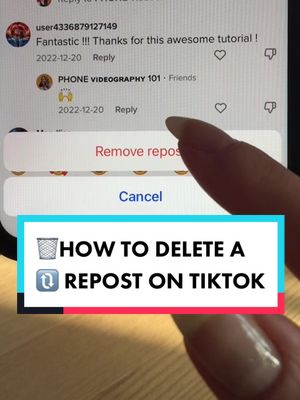
HOW TO 🗑️DELETE a Repost on TikTok
Verbal hook · 40%
Here's how undo a repost on TikTok.
Visual hook
A creator with a friendly expression speaks directly to the camera in a well-lit, clear shot, establishing an immediate personal connection.
[06]
Hook template
Steal this for your own video
HOW TO [emoji that matches the action] [quick action verb] [annoying problem or unwanted thing] on [platform, app, or tool]
- — HOW TO 🗑️ DELETE a Repost on TikTok
- — HOW TO 🔕 MUTE Group Chat Spam on iPhone
- — HOW TO ✂️ REMOVE a Background Object in Canva
[07]
Hook and payoff
The promise the opener makes, and how the video pays it back
Hook
A direct statement of the problem that will be solved, immediately hooking viewers who are experiencing that specific issue.
Payoff
A direct call to action that leverages the value just provided to ask for a low-friction engagement (like, follow) in return, framed as a reciprocal exchange.
[08]
Narrative framework
The structural pattern this video runs on
Framework
The Quick-Solve Tutorial
To solve a common, frustrating user problem by revealing a non-intuitive step-by-step process in a fast-paced, visually-guided format.
- 1
The Empathy Anchor
Frame the problem with a relatable scenario to confirm the viewer's need and build rapport.
- 2
The Action Initiator
Provide the first, simple, and obvious step to begin the process, building momentum and user confidence.
- 3
The Secret Reveal
Demonstrate the crucial, non-intuitive step that is the key to solving the problem. This is the core value of the tutorial.
- 4
The Final Execution
Show the final action that completes the process and achieves the desired outcome, providing a clear resolution.
Themes
- Social media literacy
- Tech tips
- Problem-solving
Techniques
- Direct-to-camera address
- Screen recording
- Voiceover
- Graphic overlays
Trends
- How-to content
- TikTok tutorials
Post caption
🔓New TikTok fear unlocked. If you’ve ever reposted a TikTok video by accident, or changed your mind, and wondered: “How do I delete a repost on TikTok?”, or “How do you undo a repost on TikTok?” here’s how to do it. 1. Find the video you reposted. If you don’t know where it is, search for the creator or go to your watch history to find your recently viewed videos. 2. Tap on the comment section and find the re-post notification at the top. 3. Long press on the re-post notification that looks like a comment, until a small menu appears. Then tap delete repost. How to undo a repost on TikTok How to delete a repost on TikTok ##tiktoktutorials##socialmediatips##tiktoktips##tiktokgrowthtips##tiktokgrowth
Text overlays
Transcript
Here's how undo a repost on TikTok. So you just reposted a video and you realize you wanna undo it or delete the repost. Find the video and tap on the comments. Find the repost notification that looks like a comment here and long press on it. Then you're gonna tap remove best. But do me a tiny favor, double tap if this was helpful and follow for more TikTok tutorials.