Viral Hooks
Trending short videosTutorial for watermark-free TikTok downloads
M

@misscarolineflett

TikTok · Speaker address

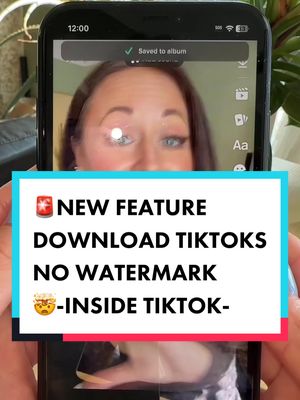
@misscarolineflett Original tutorial for how to download your video without the TikTok watermark, by ❤️Helen @themuthership @themuthership tiktok teacher💙 A lot of people have been asking me, how can I download my TikTok videos without the TikTok watermark? This is the BEST way I have found so far to repurpose your TikToks for other platforms. And it doesn’t cost you. There are a lot of sites out there that allow you to save your video, watermark free, but they often degrade the quality of the video 😭. In this tutorial, you’ll learn how to download your TikTok’s in higher quality without the TikTok logo. ##Socialmediatips##tiktoktips##tiktokwatermarkremover##tiktokwatermark ##contentcreatortips##tiktokgrowthtips##tiktoktutorial##tiktokgrowth

View original on TikTok

The edit1 shot · 6 text
Shots Text3:00

Performance

Views
2.9M
Likes
64.7K
Comments
721
Engagement
2.2%
Outlier
7.1×
Length · 2 Dec 2022
3:00

Video #7035 · Speaker address

Tutorial for watermark-free TikTok downloadsfrom @misscarolineflett

[01]

Overview

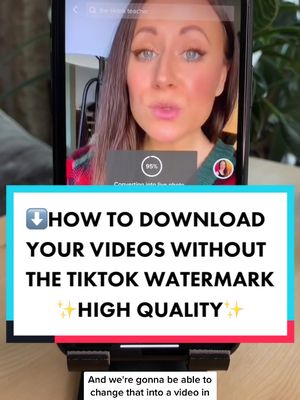
The creator provides a step-by-step tutorial on how to download a TikTok video without the watermark. She first demonstrates saving the video normally (with watermark and sound) and then as a Live Photo. She then opens the Photos app to convert the Live Photo into a video (without watermark or sound). Finally, she uses the CapCut app to import both video files, extracts the audio from the watermarked version, deletes that video clip, and layers the audio over the clean video, resulting in a watermark-free video with sound that she then exports.

[02]

Simple outline

  1. 1State common user problem
  2. 2Reveal multi-step 'hack'
  3. 3Assemble components in new app
  4. 4Refine the final product
  5. 5Show successful result

[03]

Related videos

[04]

Classification

Concepts
Tutorial / How To
Elements
Screen RecordingText OverlayTitle Text Hook

[05]

Hook analysis

What stops the scroll in the first 3 seconds

Title hook · 55%

⬇️DOWNLOAD TIKTOKS Without the WATERMARK

Verbal hook · 40%

If you're trying to find a way to download your TikTok videos without the watermark and in better quality, there's a new, simple, and easy way to do this.

Visual hook · 5%

A woman speaking directly to the camera with clear, engaging eye contact in a well-lit indoor setting, establishing an immediate personal connection.

[07]

Hook and payoff

The promise the opener makes, and how the video pays it back

Hook

A direct address to the audience, identifying a specific, high-value problem and promising a new, simple, and higher-quality solution.

Payoff

The final, perfected asset is exported, proving the method's success. This is followed by a direct call to action that frames engagement (liking, following) as a transaction for the valuable information provided.

[08]

Narrative framework

The structural pattern this video runs on

Framework

The Multi-Tool Mastery Blueprint

To solve a common, frustrating problem by guiding the viewer through a non-obvious, multi-platform workflow. The solution involves creating separate components (e.g., audio, video) and then reassembling them in a third-party tool to achieve a superior final product.

  1. 1

    The Authority Transfer

    Builds immediate trust and credibility by giving credit to another creator, positioning the information as a valuable, shared secret rather than a personal invention.

  2. 2

    The Component Creation Phase

    Guides the user through a two-part process to generate the necessary raw materials. This involves a standard action (saving the original file) and a 'secret' action (using a non-obvious feature like 'Live Photo' to create a clean version).

  3. 3

    The Asset Transformation

    Demonstrates how to convert the 'secret' file format (Live Photo) into a usable asset (a silent video) within the device's native environment (the Photos app).

  4. 4

    The Workshop Setup

    Introduces a third-party application as the 'workshop' and instructs the user to import both previously created components (the original with audio, the clean one without).

  5. 5

    The Surgical Extraction

    Shows how to isolate the desired element (audio) from the flawed component (the watermarked video) and discard the rest.

  6. 6

    The Perfect Merge

    The climax of the tutorial, where the isolated element (audio) is seamlessly combined with the clean component (the non-watermarked video), creating the desired hybrid.

  7. 7

    The Final Refinement

    Addresses and solves a final, subtle imperfection (cropping the remaining watermark), demonstrating expertise and ensuring a flawless result for the viewer.

Themes

  • Content repurposing
  • Social media hacks
  • Creator tools

Techniques

  • Screen recording
  • Direct address
  • Step-by-step instruction

Trends

  • Watermark removal tutorials

Post caption

Original tutorial for how to download your video without the TikTok watermark, by ❤️Helen @themuthership @themuthership tiktok teacher💙 A lot of people have been asking me, how can I download my TikTok videos without the TikTok watermark? This is the BEST way I have found so far to repurpose your TikToks for other platforms. And it doesn’t cost you. There are a lot of sites out there that allow you to save your video, watermark free, but they often degrade the quality of the video 😭. In this tutorial, you’ll learn how to download your TikTok’s in higher quality without the TikTok logo. ##Socialmediatips##tiktoktips##tiktokwatermarkremover##tiktokwatermark ##contentcreatortips##tiktokgrowthtips##tiktoktutorial##tiktokgrowth

Text overlays

  • title · beginning

    ⬇️DOWNLOAD TIKTOKS Without the WATERMARK

  • informational · beginning

    ✨HIGH QUALITY✨

  • call-to-action · beginning

    ✨FOLLOW✨ FOR MORE

  • contextual · middle

    *LIVE PHOTO*

  • call-to-action · end

    💕Double tap if this was helpful💕

  • call-to-action · end

    ✨TIKTOK TITORIALS✨

Transcript

If you're trying to find a way to download your TikTok videos without the watermark and in better quality, there's a new, simple, and easy way to do this. Let me show you. First of all, I learned this from Helen at tier mothership. If you're not following her, she's amazing. First, you're gonna go to the video you wanna download without the watermark and tap on it. And then next, I'm gonna tap on the three dots here or it might be the share arrow for you. Now I'm gonna tap save video, and this is actually gonna save the video to my camera roll. So that's where you're gonna be able to find it after. Next, we're gonna click on the three dots again, and we're gonna scroll over to live video and tap on that. Now this is now converting this video into a live photo, and we're gonna be able to change that into a video in just a minute. Now what I'm gonna do is go into my photos. So now I'm gonna find the live photo that I wanna change into a video because it doesn't have the TikTok watermark. So I'm gonna hit the three dots up here. Your options for more options might be below, but on my phone no, I'm gonna hit the three dots. And now I'm gonna tap save as video. And it's gonna take its tier. It's gonna save. So now on my camera roll, I have this live video. Then I also have this video, which has the sound, but it's got the TikTok watermark. Here's what we need to do next. So now we're gonna open up CapCut. This is a free editing app. And if you don't have it yet, I highly recommend you get it because it's an amazingly powerful app. Now we're gonna add both the video with the TikTok watermark and the live video with no sound. And I'm gonna add them in this order. The video first with the TikTok watermark. And then second, just the live video with no sound. Then I'm gonna tap add to. So now what I'm gonna do is tap on the video with the watermark, and then I'm gonna tap extract audio right here. This is gonna remove the audio from this video. And now what I wanna do is delete the video, leaving the audio. So I've selected the video here. All I do is tap delete. And what it actually did was it moved the video, the live video with no sound all the way over to go right on top of the audio that I extracted. So it should sound like this. TikTok seems to be going through some major updates right no. But you're probably gonna notice there is the TikTok watermark at the better, so we need to get rid of this. So now what you're gonna do is select the video clip again, scroll over, tap edit, then you're gonna tap crop. Now tier gonna make sure we are on nine by 16, which is for TikTok, and then grab the corner here and slowly crop out the TikTok logo at the bottom there until you can't see it anymore. So this looks pretty good to me. I'm gonna hit done, and then I'm gonna check my video. TikTok seems to be going through some major updates. Looks great. So now I'm gonna export it and save it to my camera roll. Now you'll be able to find your watermark free TikTok video on your camera roll. Consider double tapping if this is helpful and follow for more TikTok tutorials.

Tutorial for watermark-free TikTok downloads | Viral Hooks